 汪志鹏andHongsheng Liu
0f0e94760c
汪志鹏andHongsheng Liu
0f0e94760c
Signed-off-by: princepride <wangzhipeng628@gmail.com>
Signed-off-by: 汪志鹏 <wangzhipeng628@gmail.com>
Co-authored-by: Hongsheng Liu <liuhongsheng4@huawei.com>
13 KiB
Adding a Diffusion Model
This guide walks through the process of adding a new Diffusion model to vLLM-Omni, using Qwen/Qwen-Image-Edit as a comprehensive example.
Table of Contents
Overview
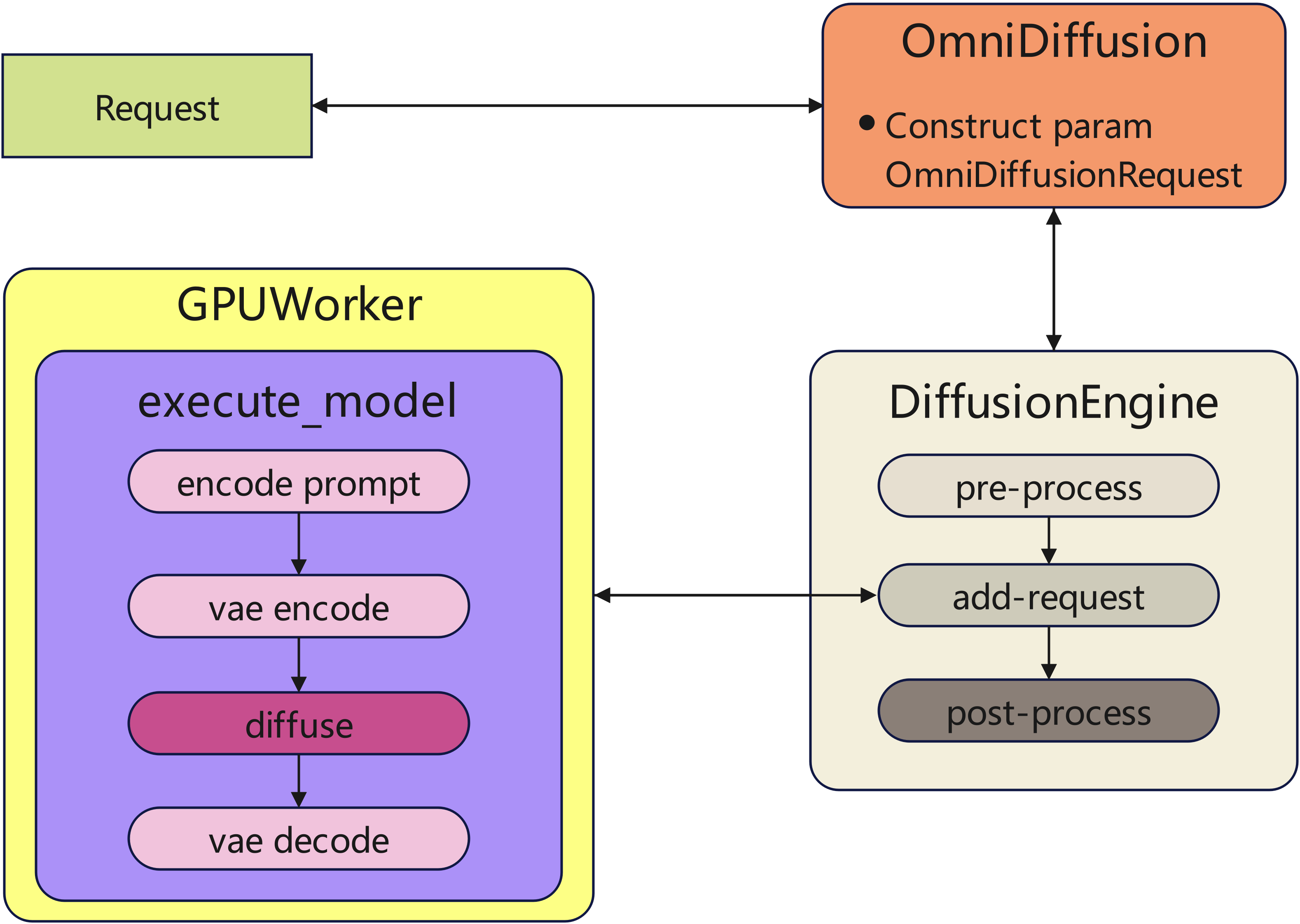
When add a new diffusion model into vLLM-Omni, additional adaptation work is required due to the following reasons:
-
New model must follow the framework’s parameter passing mechanisms and inference flow.
-
Replacing the model’s default implementations with optimized modules, which is necessary to achieve the better performance.
The diffusion execution flow as follow:
Directory Structure
File Structure for Adding a New Diffusion Model
vllm_omni/
└── examples/
    └──offline_inference
        └── example script                # reuse existing if possible (e.g., image_edit.py)
    └──online_serving
        └── example script
└── diffusion/
    └── registry.py                       # Registry work
    ├── request.py                        # Request Info
    └── models/your_model_name/           # Model directory (e.g., qwen_image)
        └── pipeline_xxx.py               # Model implementation (e.g., pipeline_qwen_image_edit.py)
Step-by-step-implementation
Step 1: Model Implementation
The diffusion pipeline’s implementation follows HuggingFace Diffusers.
1.1 Define the Pipeline Class
Define the pipeline class, e.g., QwenImageEditPipeline, and initialize all required submodules, either from HuggingFace diffusers or custom implementations. In QwenImageEditPipeline, only QwenImageTransformer2DModel is re-implemented to support optimizations such as Ulysses-SP. When adding new models in the future, you can either reuse this re-implemented QwenImageTransformer2DModel or extend it as needed.
1.2 Pre-Processing and Post-Processing Extraction
Extract the pre-processing and post-processing logic from the pipeline class to follow vLLM-Omni’s execution flow. For Qwen-Image-Edit:
def get_qwen_image_edit_pre_process_func(
    od_config: OmniDiffusionConfig,
):
    """
    Define a pre-processing function that resizes input images and
    pre-process for subsequent inference.
    """
def get_qwen_image_edit_post_process_func(
    od_config: OmniDiffusionConfig,
):
    """
    Defines a post-processing function that post-process images.
    """
1.3 Define the forward function
The forward function of QwenImageEditPipeline follows the HuggingFace diffusers design for the most part. The key differences are:
- As described in the overview, arguments are passed through
OnniDiffusionRequest, so we need to get user parameters from it accordingly.
prompt = req.prompt
- pre/post-processing are handled by the framework elsewhere, so skip them.
1.4 Replace some ops or layers in DiT component
vLLM-Omni provides a set of optimized operators with better performance and built-in support for parallelism, including attention, rotary embeddings (RoPE), and linear layers.
Below is an example showing how to replace standard Transformer attention and FFN layers with vLLM-Omni implementations:
from vllm_omni.diffusion.attention.layer import Attention
from vllm_omni.diffusion.layers.rope import RotaryEmbedding

class MyAttention(nn.Module):
    def __init__(self):
        super().__init__()
        self.attn = Attention()
        self.to_qkv = QKVParallelLinear()
        self.to_out = RowParallelLinear()
        self.rope = RotaryEmbedding(is_neox_style=False)

    def forward(self, hidden_states):
        qkv, _ = self.to_qkv(hidden_states)
        q, k, v = qkv.split(...)
        q, k = self.rope(...)
        attn_output = self.attn(q, k, v)
        output = self.to_out(attn_output)

class MyFFN(nn.Module):
    def __init__(self):
        super().__init__()
        self.fc1 = ColumnParallelLinear()
        self.fc2 = RowParallelLinear()
        self.act = F.gelu

    def forward(self, hidden_states):
        hidden, _ = self.fc1(hidden_states)
        hidden = self.act(hidden)
        output = self.fc2(hidden)
        return output
In this example:
-
Attention uses vLLM-Omni’s optimized attention kernel together with parallel QKV projection and RoPE.
-
Linear layers are replaced with column- and row-parallel variants to enable tensor parallelism.
-
The FFN follows a standard two-layer structure and can be further optimized (e.g., using fused or merged projections) if needed.
1.5 Provide a _repeated_blocks in DiT model
_repeated_blocks is the small and frequently-repeated block(s) of a model -- typically a transformer layer.
It's used for torch compile optimizations.
_repeated_blocks = ["QwenImageTransformerBlock"]
1.6 (Optional) implement sequence parallelism
vLLM-Omni has a non-intrusive _sp_plan that enable sequence parallel without modifying forward() logic.
You can refer to How to parallelize a new model
1.7 (Optional) integrate with Cache-Dit
vLLM-Omni supports acceleration via Cache-Dit. Most models compatible with Diffusers can use Cache-Dit seamlessly. For new models, you can extend support by modifyingcache_dit_backend.py
Step 2: Extend OmniDiffusionRequest Fields
User-provided inputs are ultimately passed to the model’s forward method through OmniDiffusionRequest, so we add the required fields here to support the new model.
prompt: str | list[str] | None = None
negative_prompt: str | list[str] | None = None
...
Step 3: Registry
- registry diffusion model in registry.py
_DIFFUSION_MODELS = {
    # arch:(mod_folder, mod_relname, cls_name)
    ...
    "QwenImageEditPipeline": (
        "qwen_image",
        "pipeline_qwen_image_edit",
        "QwenImageEditPipeline",
    ),
    ...
}
- registry pre-process get function
_DIFFUSION_PRE_PROCESS_FUNCS = {
    # arch: pre_process_func
    ...
    "QwenImageEditPipeline": "get_qwen_image_edit_pre_process_func",
    ...
}
- registry post-process get function
_DIFFUSION_POST_PROCESS_FUNCS = {
    # arch: post_process_func
    ...
    "QwenImageEditPipeline": "get_qwen_image_edit_post_process_func",
    ...
}
Step 4: Add an Example Script
For each newly integrated model, we need to provide examples script under the examples/ to demonstrate how to initialize the pipeline with Omni, pass in user inputs, and generate outputs. Key point for writing the example:
-
Use the Omni entrypoint to load the model and construct the pipeline.
-
Show how to format user inputs and pass them via omni.generate(...).
-
Demonstrate the common runtime arguments, such as:
-
model path or model name
-
input image(s) or prompt text
-
key diffusion parameters (e.g., inference steps, guidance scale)
-
optional acceleration backends (e.g., Cache-DiT, TeaCache)
-
-
Save or display the generated results so users can validate the integration.
Step 5: TeaCache Coefficient Estimation (Optional)
If your model supports TeaCache acceleration, you need to estimate the polynomial coefficients for optimal caching performance.
5.1 Add Extractor Function
First, implement an extractor function in vllm_omni/diffusion/cache/teacache/extractors.py. The extractor extracts the modulated input and defines how to run transformer blocks:
def extract_your_model_context(
    module: nn.Module,
    hidden_states: torch.Tensor,
    timestep: torch.Tensor,
    **kwargs: Any,
) -> CacheContext:
    # 1. Preprocessing
    temb = module.time_embed(timestep)

    # 2. Extract modulated input (for cache decision)
    modulated_input = module.transformer_blocks[0].norm1(hidden_states, temb)

    # 3. Define transformer execution
    def run_transformer_blocks():
        h = hidden_states
        for block in module.transformer_blocks:
            h = block(h, temb=temb)
        return (h,)

    # 4. Define postprocessing
    def postprocess(h):
        return module.proj_out(module.norm_out(h, temb))

    return CacheContext(
        modulated_input=modulated_input,
        hidden_states=hidden_states,
        encoder_hidden_states=None,
        temb=temb,
        run_transformer_blocks=run_transformer_blocks,
        postprocess=postprocess,
    )
Register it in EXTRACTOR_REGISTRY:
EXTRACTOR_REGISTRY = {
    ...
    "YourTransformer2DModel": extract_your_model_context,
}
5.2 Add Adapter for Coefficient Estimation
Add an adapter in vllm_omni/diffusion/cache/teacache/coefficient_estimator.py:
class YourModelAdapter:
    @staticmethod
    def load_pipeline(model_path: str, device: str, dtype: torch.dtype) -> Any:
        # Load your pipeline
        ...

    @staticmethod
    def get_transformer(pipeline: Any) -> tuple[Any, str]:
        return pipeline.transformer, "YourTransformer2DModel"

    @staticmethod
    def install_hook(transformer: Any, hook: DataCollectionHook) -> None:
        registry = HookRegistry.get_or_create(transformer)
        registry.register_hook(hook._HOOK_NAME, hook)

_MODEL_ADAPTERS["YourModel"] = YourModelAdapter
5.3 Run Coefficient Estimation
Use the provided script to estimate coefficients:
from vllm_omni.diffusion.cache.teacache.coefficient_estimator import (
    TeaCacheCoefficientEstimator,
)
from datasets import load_dataset
from tqdm import tqdm

# Load model
estimator = TeaCacheCoefficientEstimator(
    model_path="/path/to/model",
    model_type="Bagel",  # Your model type
    device="cuda",
)

# Load prompts (paper suggests ~70 prompts)
dataset = load_dataset("nateraw/parti-prompts", split="train")
prompts = dataset["Prompt"][:70]

# Collect data
for prompt in tqdm(prompts):
    estimator.collect_from_prompt(prompt, num_inference_steps=50)

# Estimate coefficients
coeffs = estimator.estimate(poly_order=4)
print(f"Coefficients: {coeffs}")
5.4 Interpreting Coefficient Estimation Results
The estimator outputs statistics and polynomial coefficients. Here's how to interpret them:
Example Output:
Data statistics:
Count: 48
Input Diffs (x): min=1.1089e-02, max=5.2555e-02, mean=2.8435e-02
Output Diffs (y): min=2.8242e-02, max=2.9792e-01, mean=7.0312e-02
Coefficients: [1333131.29, -168644.23, 7950.51, -163.75, 1.26]
What to Check:
- Count: Number of timestep pairs analyzed. Should be at least 30-50 for reliable estimation. Low count suggests insufficient prompts or inference steps.
- Input/Output Ranges: Verify output differences correlate with input differences. If ranges seem unusual, check your prompt diversity.
- Coefficient Magnitude: Extremely large values (>1e8) may indicate numerical instability - try collecting more diverse data.
Troubleshooting:
- If results seem unreliable, try:
- Increasing number of prompts (100+ recommended)
- Using more diverse prompts from multiple datasets
- Adjusting
num_inference_steps(try 20, 50, 100)
5.5 Add Coefficients to Config
Add the estimated coefficients to vllm_omni/diffusion/cache/teacache/config.py:
_MODEL_COEFFICIENTS = {
    ...
    "YourTransformer2DModel": [
        1.04730573e+06,  # a4
        -1.34150749e+05, # a3
        6.51517806e+03,  # a2
        -1.41209108e+02, # a1
        1.17241808e+00,  # a0
    ],
}
Step 6: Open a Pull Request
When submitting a pull request to add support for a new model, please include the following information in the PR description:
-
Output verification: provide generation outputs to verify correctness and model behavior.
-
Inference speed: provide a comparison with the corresponding implementation in Diffusers.
-
Parallelism support: specify the supported parallel sizes and any relevant limitations.
-
Cache acceleration: check whether the model can be accelerated using Cache-Dit or not.
Providing these details helps reviewers evaluate correctness, performance improvements, and parallel scalability of the new model integration.
Testing
For comprehensive testing guidelines, please refer to the Test File Structure and Style Guide.
Adding a Model Recipe
After implementing and testing your model, please add a model recipe to the vllm-project/recipes repository. This helps other users understand how to use your model with vLLM-Omni.